GuideWatch is a focused, read-only companion to your guider - NINA's Advanced API or PHD2's Event Server. It shows you what's happening on your watch, so you don't have to keep checking your laptop to find out.
📈
Live guiding graph
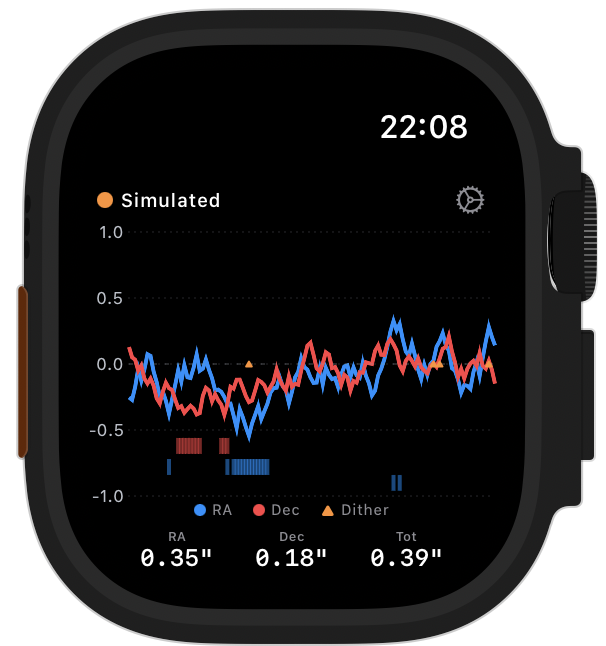
RA/Dec error trends updating in real time, with correction ticks and dither markers, just like the graph inside PHD2.
🎯
RMS & guiding stats
RA, Dec and total RMS at a glance. Optional haptic alert when guiding error crosses a threshold you set in Settings.
⌚
Guiding & Moon complication
One watch face slot that shows total RMS and guiding state while a session is live, then swaps to tonight's moon phase and how much of it is lit when you're not guiding.
📶
Connection status
Know instantly if guiding has dropped out or the rig has gone quiet. After a Wi-Fi drop, older chart data is shown dimmed until fresh steps arrive.
🛰️
Local network only
Connects directly to your NINA or PHD2 machine over Wi-Fi. No internet, no cloud, no account.
🎛️
Simple setup
In Settings, pick NINA (port 1888) or PHD2 (port 4400), enter the host IP, and tap Connect. GuideWatch remembers the source and port separately.
🧪
Simulation mode
The app starts in simulation so you can explore the UI before connecting to a live rig. Long-press the chart to toggle it on or off quickly.